> ## Documentation Index
> Fetch the complete documentation index at: https://docs.verisoul.ai/llms.txt
> Use this file to discover all available pages before exploring further.

# Integration Overview

> How to integrate Verisoul into your application

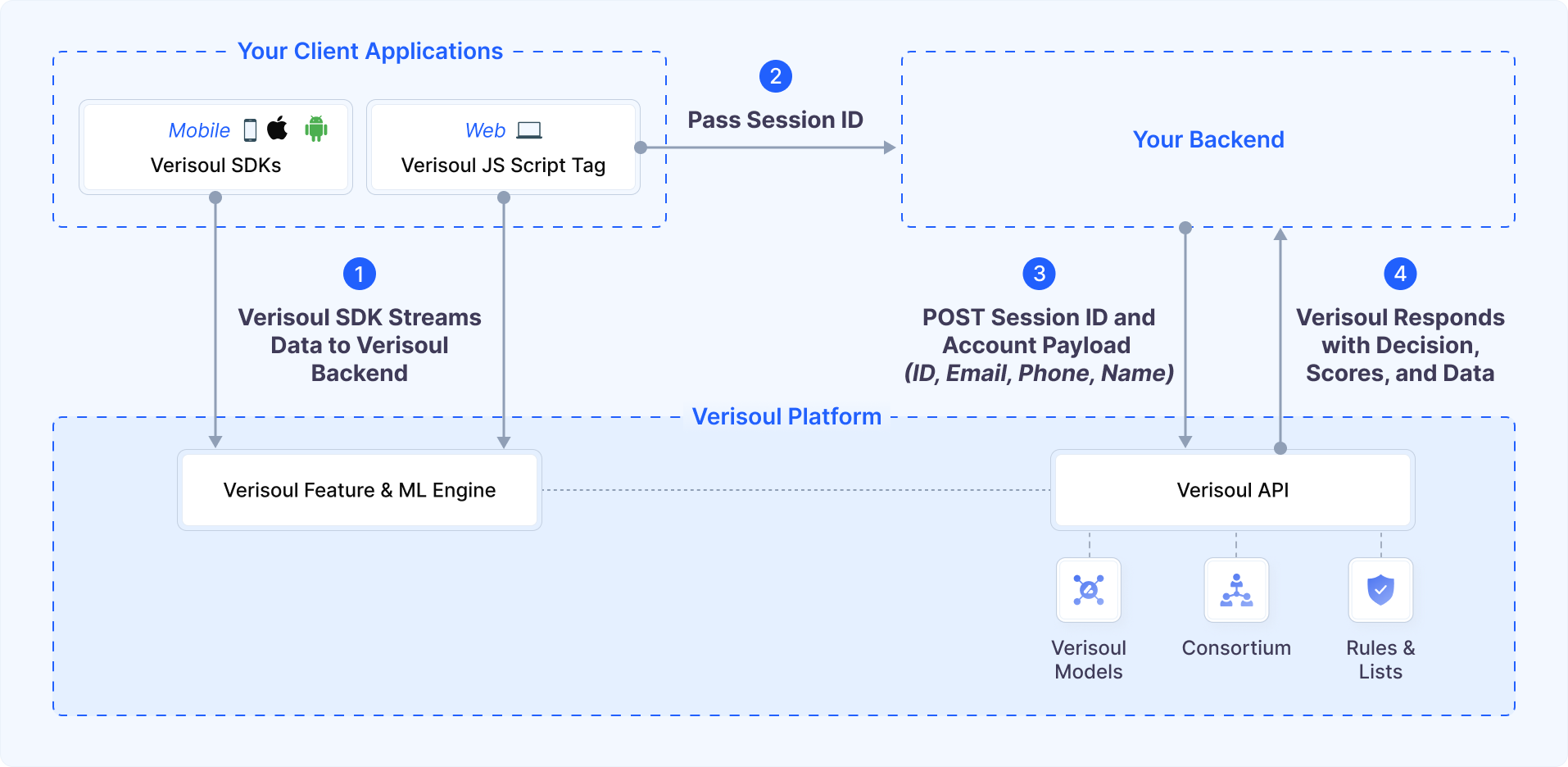
This guide provides a comprehensive overview of Verisoul's fraud prevention system and how to integrate it into your application.

<Frame>
  <img src="https://mintcdn.com/verisoul/wdkmEtsUGEUd5DIj/images/integration-diagram-new.png?fit=max&auto=format&n=wdkmEtsUGEUd5DIj&q=85&s=5dd9e9caa719d1bf5b999ae203c19203" alt="Integration Architecture" width="1914" height="936" data-path="images/integration-diagram-new.png" />
</Frame>

## Integration Flow

<Steps>
  <Step title="Initialize SDK">
    Add the Verisoul SDK to your application and initialize it early in your app's lifecycle.

    <p>
      <b>Supported platforms:</b> Web, iOS, Android, React Native, Flutter, WebView
    </p>
  </Step>

  <Step title="Collect Signals">
    <p>
      After initialization, the Verisoul SDK automatically begins collecting signals in the background with minimal impact on performance:
    </p>

    <CardGroup cols={3}>
      <Card title="Network Signals" color="#0066CC" icon="network-wired" iconType="duotone">
        Fingerprint network interfaces, IP addresses, and geolocation
      </Card>

      <Card title="Device Signals" color="#0066CC" icon="laptop" iconType="duotone">
        Fingerprint device properties, hardware, and software
      </Card>

      <Card title="Behavioral Signals" color="#0066CC" icon="user-gear" iconType="duotone">
        Continuously monitor mouse moves, touches, and keystrokes
      </Card>
    </CardGroup>
  </Step>

  <Step title="Get Session ID">
    <p>
      Get a unique and short-lived session token for the current user session
    </p>

    <ul>
      <li>Required for all API calls to our backend</li>
      <li>Resistant to replay attacks</li>
    </ul>

    <Tip>
      Retrieve the session ID at critical points in your user journey such as sign up, login, withdrawal requests, or high-value transactions.
    </Tip>
  </Step>

  <Step title="Get Decision and Signals">
    <p>
      Make a secure call to our API from your backend server with the session\_id and optionally user identifiers
    </p>

    <CardGroup cols={2}>
      <Card title="Decision" icon="server" iconType="duotone">
        <ul>
          <li>
            Final decision categorized as:

            <ul>
              <li><strong>Fake</strong>: High probability of fraud</li>
              <li><strong>Suspicious</strong>: Elevated risk indicators</li>
              <li><strong>Real</strong>: Legitimate user</li>
            </ul>
          </li>
        </ul>
      </Card>

      <Card title="Signals" icon="chart-mixed" iconType="duotone">
        <ul>
          <li>Proxies, VPNs, Tor, Datacenters</li>
          <li>Impossible Travel</li>
          <li>Emulators and Fake Devices</li>
          <li>Automated Bots</li>
          <li>Linked Accounts</li>
        </ul>
      </Card>
    </CardGroup>
  </Step>

  <Step title="Take Action">
    <p>
      Based on the Verisoul response, segment users based on your use case:
    </p>

    <CardGroup cols={3}>
      <Card title="Fake Users" color="#DC2626" icon="shield-xmark" iconType="duotone">
        Block access or implement step-up verification for users with high probability of fraud
      </Card>

      <Card title="Suspicious Users" color="#F29D38" icon="shield-exclamation" iconType="duotone">
        Monitor activity closely and consider additional verification for high-value actions
      </Card>

      <Card title="Real Users" color="#0A7B2E" icon="shield-check" iconType="duotone">
        Allow seamless access without unnecessary friction
      </Card>
    </CardGroup>
  </Step>
</Steps>

## Ready to Begin?

<CardGroup cols={3}>
  <Card title="Frontend Integration" icon="browser" href="/integration/frontend/browser">
    Detailed guide for implementing the client-side SDK in web and mobile applications
  </Card>

  <Card title="Backend Integration" icon="server" href="/integration/backend/authenticated">
    Step-by-step instructions for server-side authentication and risk assessment
  </Card>

  <Card title="Example Apps" icon="code" href="/examples/web-sample-app">
    Complete reference implementation demonstrating best practices
  </Card>
</CardGroup>